Endpoint agent scripts
Two scripts from my endpoint work: one checks every security agent on a device in one pass, the other let support teams onboard devices to Defender without waiting for us.
Portfolio reconstructions with placeholder paths. Service patterns are generic; confirm them against your own agent versions.
1. Master agent check
Checking a device used to mean opening services.msc, then each console in turn. I wrote a batch file that checked SentinelOne, Defender, ManageEngine, Forescout and later Lansweeper in one pass, and a PowerShell check for the Zscaler client. Either could run as local admin or be pushed through the remote-script feature of any of our consoles. This master script combines them and writes every result to an evidence log.
| Agent | What it looks for | Deeper check |
|---|---|---|
| SentinelOne | Agent, helper, static engine and log processor services | Saves the agent's own sentinelctl status report as evidence |
| Microsoft Defender | WinDefend and Sense (the Defender for Endpoint sensor) | Running mode (normal or passive), real-time protection, signature age, onboarding state |
| Zscaler | Client Connector services | Installed version, whether traffic actually leaves through Zscaler, and which cloud |
| Trend Micro | Apex One services | — |
| ManageEngine | Endpoint Central agent service | — |
| Forescout | SecureConnector service | — |
| Lansweeper | Lansweeper agent service | — |
| DLP agent | Your DLP product's endpoint service | — |
Sample output
Fictional device, mid-migration: SentinelOne and Trend Micro are retired, and one agent is installed but stopped.
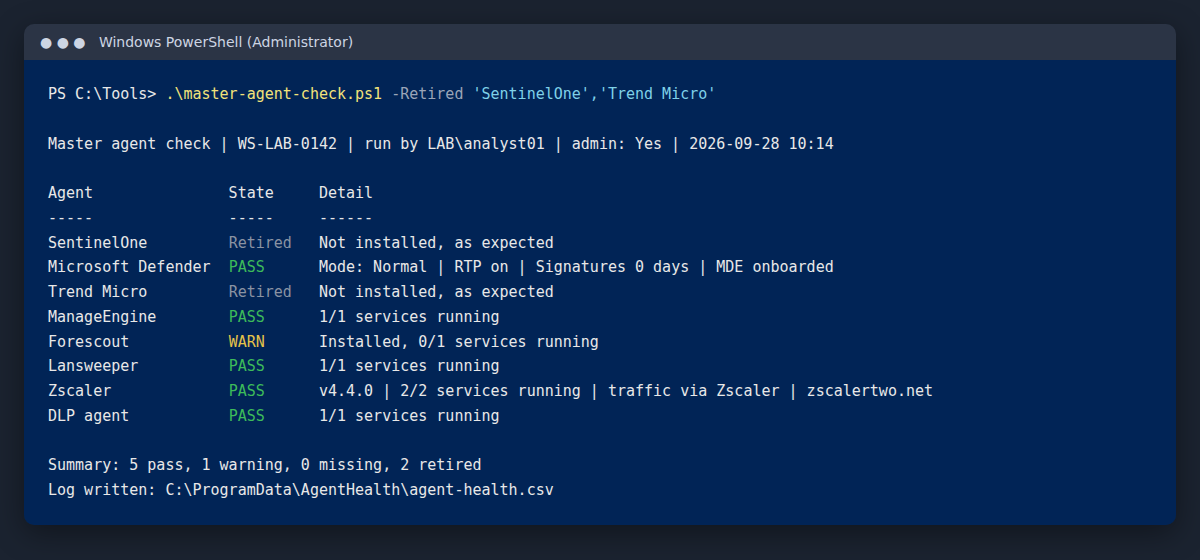
<#
.SYNOPSIS
  Master endpoint agent check: one pass over every security agent on a
  Windows device, with deeper checks for Defender, SentinelOne and Zscaler.

.NOTES
  Portfolio reconstruction. Rebuilt with AI assistance from memory of the
  scripts I used at a bank; the originals stayed with the employer.
  Service patterns are generic. Confirm them against your own agent versions.
  No employer data, hostnames or tokens.

  Run locally as administrator for full detail, or push it through an EDR or
  management console's remote-script feature.

.EXAMPLE
  .\master-agent-check.ps1 -Retired 'SentinelOne','Trend Micro'
  Agents listed in -Retired are expected to be absent after a migration.
  If one is still installed, it is flagged for removal.

.EXAMPLE
  .\master-agent-check.ps1 -SkipNetwork
  Skips the Zscaler cloud test (for devices with no internet path).
#>
param(
  [string[]]$Retired = @(),
  [string]$LogFolder = "$env:ProgramData\AgentHealth",
  [switch]$SkipNetwork
)

# Agent -> service patterns, matched against service name or display name.
$Agents = [ordered]@{
  'SentinelOne'        = 'SentinelAgent','SentinelHelperService','SentinelStaticEngine','LogProcessorService'
  'Microsoft Defender' = 'WinDefend','Sense'
  'Trend Micro'        = '*Apex One*','*Trend Micro*'
  'ManageEngine'       = '*ManageEngine*Agent*'
  'Forescout'          = '*SecureConnector*'
  'Lansweeper'         = '*Lansweeper*'
  'Zscaler'            = 'ZSA*','*Zscaler*'
  'DLP agent'          = '*DLP*'    # broad pattern: narrow it to your DLP product
}

$isAdmin = ([Security.Principal.WindowsPrincipal][Security.Principal.WindowsIdentity]::GetCurrent()).IsInRole(
             [Security.Principal.WindowsBuiltInRole]::Administrator)
$runBy = "$env:USERDOMAIN\$env:USERNAME"
$stamp = Get-Date -Format 'yyyy-MM-dd HH:mm'
$allServices = Get-Service -ErrorAction SilentlyContinue
New-Item -ItemType Directory -Path $LogFolder -Force | Out-Null

function Get-AgentServices([string[]]$Patterns) {
  $allServices | Where-Object {
    $svc = $_
    $Patterns | Where-Object { $svc.Name -like $_ -or $svc.DisplayName -like $_ }
  } | Sort-Object Name -Unique
}

function Get-InstalledVersion([string]$NamePattern) {
  $keys = 'HKLM:\SOFTWARE\Microsoft\Windows\CurrentVersion\Uninstall\*',
          'HKLM:\SOFTWARE\WOW6432Node\Microsoft\Windows\CurrentVersion\Uninstall\*'
  (Get-ItemProperty $keys -ErrorAction SilentlyContinue |
    Where-Object DisplayName -like $NamePattern | Select-Object -First 1).DisplayVersion
}

$results = foreach ($agent in $Agents.Keys) {
  $svc = @(Get-AgentServices $Agents[$agent])

  # 1. Service layer: installed? running?
  if ($svc.Count -eq 0) {
    if ($Retired -contains $agent) { $state = 'Retired'; $detail = 'Not installed, as expected' }
    else                           { $state = 'MISSING'; $detail = 'No matching service found' }
  }
  else {
    $running = @($svc | Where-Object Status -eq 'Running').Count
    if ($running -eq $svc.Count) { $state = 'PASS'; $detail = "$running/$($svc.Count) services running" }
    else                         { $state = 'WARN'; $detail = "Installed, $running/$($svc.Count) services running" }
    if ($Retired -contains $agent) { $state = 'WARN'; $detail = "Should be removed: $detail" }
  }

  # 2. Deeper checks where running services are not proof of protection
  if ($svc.Count -gt 0 -and $Retired -notcontains $agent) {
    switch ($agent) {

      'Microsoft Defender' {
        # Services run even on devices never onboarded, and in passive mode beside another EDR.
        try {
          $mp  = Get-MpComputerStatus -ErrorAction Stop
          $onb = (Get-ItemProperty 'HKLM:\SOFTWARE\Microsoft\Windows Advanced Threat Protection\Status' `
                    -ErrorAction SilentlyContinue).OnboardingState
          $rtp = if ($mp.RealTimeProtectionEnabled) { 'on' } else { 'off' }
          $mde = if ($onb -eq 1) { 'onboarded' } else { 'not onboarded' }
          $detail = "Mode: $($mp.AMRunningMode) | RTP $rtp | Signatures $($mp.AntivirusSignatureAge) days | MDE $mde"
          if (-not $mp.RealTimeProtectionEnabled -or $mp.AntivirusSignatureAge -gt 3 -or $onb -ne 1) { $state = 'WARN' }
        }
        catch { $detail += ' | Defender status unavailable: run as administrator' }
      }

      'SentinelOne' {
        # Save the agent's own status report as evidence for the console team.
        $ctl = Get-ChildItem 'C:\Program Files\SentinelOne\Sentinel Agent*\SentinelCtl.exe' -ErrorAction SilentlyContinue |
               Select-Object -First 1
        if ($ctl) {
          $out = Join-Path $LogFolder "sentinelctl-status-$env:COMPUTERNAME.txt"
          & $ctl.FullName status 2>&1 | Out-File $out
          $detail += " | sentinelctl status saved"
        }
      }

      'Zscaler' {
        # Services running is not the same as traffic going through the cloud.
        $ver = Get-InstalledVersion '*Zscaler*'
        if ($ver) { $detail = "v$ver | $detail" }
        if (-not $SkipNetwork) {
          try {
            $page = (Invoke-WebRequest 'https://ip.zscaler.com' -UseBasicParsing -TimeoutSec 10).Content
            if ($page -match 'via Zscaler') {
              $cloud = if ($page -match '(zscaler[a-z0-9]*\.net)') { $Matches[1] } else { 'cloud not shown' }
              $detail += " | traffic via Zscaler | $cloud"
            }
            else { $state = 'WARN'; $detail += ' | traffic NOT via Zscaler (tunnel down or client suspended?)' }
          }
          catch { $state = 'WARN'; $detail += ' | ip.zscaler.com unreachable' }
        }
      }
    }
  }

  [pscustomobject]@{
    Timestamp = $stamp; Computer = $env:COMPUTERNAME; RunBy = $runBy; Admin = $isAdmin
    Agent = $agent; State = $state; Detail = $detail
  }
}

# Console report
$colour = @{ PASS = 'Green'; WARN = 'Yellow'; MISSING = 'Red'; Retired = 'DarkGray' }
$adminText = if ($isAdmin) { 'Yes' } else { 'No' }
Write-Host ""
Write-Host "Master agent check | $env:COMPUTERNAME | run by $runBy | admin: $adminText | $stamp"
Write-Host ""
Write-Host ("{0,-20}{1,-10}{2}" -f 'Agent', 'State', 'Detail')
Write-Host ("{0,-20}{1,-10}{2}" -f '-----', '-----', '------')
foreach ($r in $results) {
  Write-Host ("{0,-20}" -f $r.Agent) -NoNewline
  Write-Host ("{0,-10}" -f $r.State) -NoNewline -ForegroundColor $colour[$r.State]
  Write-Host $r.Detail
}
$count = { param($s) @($results | Where-Object State -eq $s).Count }
Write-Host ""
Write-Host ("Summary: {0} pass, {1} warning, {2} missing, {3} retired" -f `
  (& $count 'PASS'), (& $count 'WARN'), (& $count 'MISSING'), (& $count 'Retired'))

# Evidence log: one row per agent per run
$log = Join-Path $LogFolder 'agent-health.csv'
$results | Export-Csv -Path $log -Append -NoTypeInformation
Write-Host "Log written: $log"
2. Self-service Defender onboarding
During the Defender rollout, IT and server support kept asking us for the onboarding script by email or ticket. Instead, I put a wrapper on a shared folder. Anyone could run it, and it recorded who ran it, when, and whether they had local admin rights, so we always knew where onboarding attempts came from.
- Record the attempt. Computer name, user and admin rights go to a shared log before anything runs.
- Refuse without admin rights, and log the refusal, so failed attempts are visible too.
- Run the onboarding package from the share.
- Verify, don't assume. Check that the Sense service is running and the onboarding state is set, then log the outcome.
@echo off
setlocal EnableExtensions
REM ==================================================================
REM  Self-service Microsoft Defender for Endpoint onboarding wrapper
REM  Portfolio reconstruction, rebuilt with AI assistance. Not the original.
REM  Placeholder share path. The real onboarding package is tenant-specific,
REM  downloaded from the Defender portal, and is NOT included here.
REM ==================================================================
set "SHARE=\\fileserver.example.local\DefenderOnboarding"
set "PKG=%SHARE%\WindowsDefenderATPLocalOnboardingScript.cmd"
set "LOG=%SHARE%\logs\onboarding-log.csv"

for /f %%t in ('powershell -NoProfile -Command "Get-Date -Format s"') do set "TS=%%t"
set "WHO=%USERDOMAIN%\%USERNAME%"

REM Who is running this, and with what rights?
net session >nul 2>&1
if %errorlevel%==0 (set "ADMIN=Yes") else (set "ADMIN=No")

if not exist "%LOG%" echo Timestamp,Computer,RunBy,Admin,Result>"%LOG%"

if "%ADMIN%"=="No" (
  echo %TS%,%COMPUTERNAME%,%WHO%,No,Refused - not run as administrator>>"%LOG%"
  echo This must be run as administrator. Your attempt has been logged.
  pause & exit /b 1
)

if not exist "%PKG%" (
  echo %TS%,%COMPUTERNAME%,%WHO%,Yes,Failed - onboarding package not found>>"%LOG%"
  echo Onboarding package not found. Contact the endpoint security team.
  pause & exit /b 2
)

echo %TS%,%COMPUTERNAME%,%WHO%,Yes,Started>>"%LOG%"
call "%PKG%"

REM Give the sensor time to start, then verify rather than assume
timeout /t 30 /nobreak >nul
set "SENSE=Not running"
sc query Sense | find "RUNNING" >nul && set "SENSE=Running"
set "ONBOARDED=No"
reg query "HKLM\SOFTWARE\Microsoft\Windows Advanced Threat Protection\Status" /v OnboardingState 2>nul | find "0x1" >nul && set "ONBOARDED=Yes"

for /f %%t in ('powershell -NoProfile -Command "Get-Date -Format s"') do set "TS=%%t"
echo %TS%,%COMPUTERNAME%,%WHO%,Yes,Finished - Sense %SENSE%; onboarded %ONBOARDED%>>"%LOG%"
echo.
echo Sense service: %SENSE%
echo Onboarded:     %ONBOARDED%
echo Result logged. If Onboarded says No, raise a ticket quoting this computer name.
pause
endlocal
How these were made
I could not take the originals with me. Both scripts are rebuilt from memory with AI assistance. The value was never the code; it was knowing which checks prove a device is actually protected.